CertExams.com Simulator Lab Exercises Answers
Console Based :
Description: The purpose of this Lab is to configure IP Address on all the devices and test for ping command.
Instructions:
1. Assign the IP address of all the devices as given below
| Device | Interface | IP Address | Mask |
| R1 | So-0/0/0 So-1/0/0 | 192.168.1.1 192.168.3.2 | 255.255.255.0 255.255.255.0 |
| R2 | So-0/0/0 So-1/0/0 | 192.168.1.2 192.168.2.1 | 255.255.255.0 255.255.255.0 |
| R3 | So-0/0/0 So-1/0/0 | 192.168.2.2 192.168.3.1 | 255.255.255.0 255.255.255.0 |
2. From R1 issue a ping command to R2 and R3
On R1:
user@R1>configure
[edit]
user@R1#edit interfaces so-0/0/0
[edit interfaces so-0/0/0]
user@R1#edit unit 0 family inet
[edit interfaces so-0/0/0 unit 0 family inet]
user@R1#set address 192.168.1.1/24
[edit interfaces so-0/0/0 unit 0 family inet]
user@R1#exit
[edit interfaces so-0/0/0]
user@R1#exit
[edit]
user@R1#edit interfaces so-1/0/0
[edit interfaces so-1/0/0]
user@R1#edit unit 0 family inet
[edit interfaces so-1/0/0 unit 0 family inet]
user@R1#set address 192.168.3.2/24
[edit interfaces so-1/0/0 unit 0 family inet]
user@R1#exit
[edit interfaces so-1/0/0]
user@R1#exit
[edit]
user@R1#
On R2:
user@R2>configure
[edit]
user@R2#edit interfaces so-0/0/0
[edit interfaces so-0/0/0]
user@R2#edit unit 0 family inet
[edit interfaces so-0/0/0 unit 0 family inet]
user@R2#set address 192.168.1.2/24
[edit interfaces so-0/0/0 unit 0 family inet]
user@R2#exit
[edit interfaces so-0/0/0]
user@R2#exit
[edit]
user@R2#edit interfaces so-1/0/0
[edit interfaces so-1/0/0]
user@R2#edit unit 0 family inet
[edit interfaces so-1/0/0 unit 0 family inet]
user@R2#set address 192.168.2.1/24
[edit interfaces so-1/0/0 unit 0 family inet]
user@R2#exit
[edit interfaces so-1/0/0]
user@R2#exit
[edit]
user@R2#
On R3:
user@R3>configure
[edit]
user@R3#edit interfaces so-0/0/0
[edit interfaces so-0/0/0]
user@R3#edit unit 0 family inet
[edit interfaces so-0/0/0 unit 0 family inet]
user@R3#set address 192.168.2.2/24
[edit interfaces so-0/0/0 unit 0 family inet]
user@R3#exit
[edit interfaces so-0/0/0]
user@R3#exit
[edit]
user@R3#edit interfaces so-1/0/0
[edit interfaces so-1/0/0]
user@R3#edit unit 0 family inet
[edit interfaces so-1/0/0 unit 0 family inet]
user@R3#set address 192.168.3.1/24
[edit interfaces so-1/0/0 unit 0 family inet]
user@R3#exit
[edit interfaces so-1/0/0]
user@R3#exit
[edit]
user@R3#
On R1:
user@R1>ping 192.168.2.2
user@R1>192.168.2.1
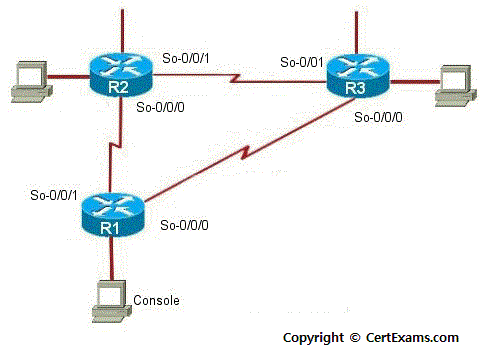
Note: .1 on router 1 S0 refers to 192.1168.1.1. Similarly other
IP addresses to be interpreted.
GUI Based :
Instructions:
1. Select device R1 from Select device drop down box
2. Click configure button to enable left navigation pane
3. Select Interfaces -> Interface Configuration Interface Configuration screen appears select so-0/0/0 interface from available interface list and click Edit button.
4. Configure Interfaces screen appears enter the ip address and mask as per the above table and click OK button.
5. Select So-0/0/1 interface from available interface list and click edit button.
6. Repeat step 4 to assign ip address of So-0/0/1 interface
7. Select device R2 from Select device drop down box
8. Repeat steps 2-4 to assign ip addresses to so-0/0/0 and so-0/0/1 interface of R2
9. Select device R3 from Select device drop down box
10. Repeat steps 2-4 to assign ip addresses to so-0/0/0 and so-0/0/1 interface of R3
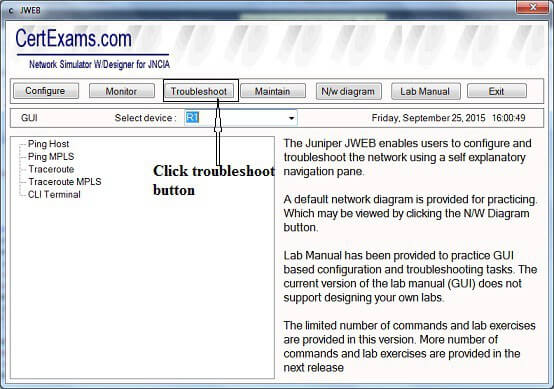
11. To check the connectivity select R1 from select device drop down box
12. Click Troubleshoot button to enable left navigation pane of troubleshoot button
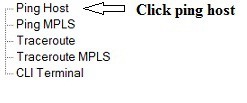
13. Click ping Host from left navigation pane
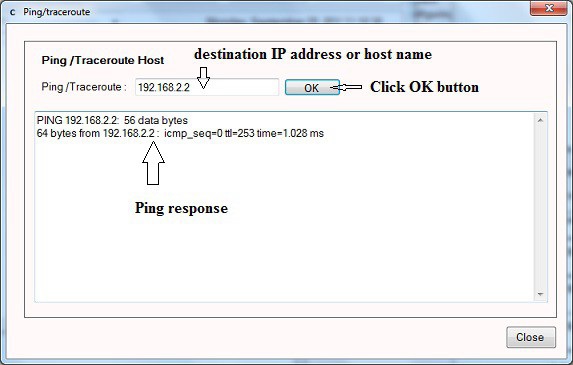
14. Ping/traceroute window appears enter the ip address 192.168.2.2 in the Ping field and click OK button.