CertExams.com Simulator Lab Exercises Answers
Description: The purpose of this lab is to configure NAT on the destination router (NAT outside source) and test for connectivity by pinging a remote router.
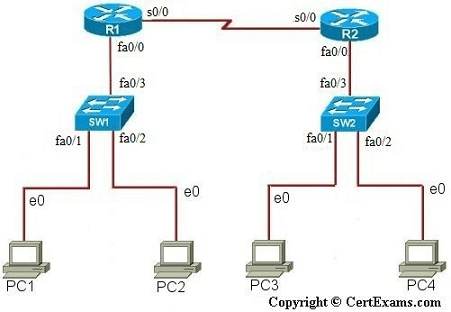
IP Address Assignment Table
| Device | Interface | IP Address | Mask |
| R1 | S0/0 Fa0/0 |
200.200.200.1 |
255.255.255.0 255.255.0.0 |
| R2 | S0/0 Fa0/0 |
200.200.200.2 10.1.1.4 |
255.255.255.0 255.0.0.0 |
| PC1 | 192.168.1.10 | 255.255.0.0 | |
| PC2 | 192.168.1.11 | 255.255.0.0 | |
| PC3 | 10.1.1.1 | 255.0.0.0 | |
| PC4 | 10.1.1.2 | 255.0.0.0 | |
| SW1 | 192.168.1.12 | 255.255.0.0 | |
| SW2 | 10.1.1.3 | 255.0.0.0 |
NAT Mapping Table for Outside Source
| Outside Local | Outside Global |
| 10.1.1.1 | 200.200.200.3 |
| 10.1.1.2 | 200.200.200.4 |
Instructions:
1. Assign IP addresses on all the devices as per the table given above
2. Create IP NAT Mapping (Hint: use outside source static command) on R2
3. Define IP NAT Inside and IP NAT Outside interfaces on R2
4. Test for Connectivity from PC1 to R2 by issuing ping command
You need to assign the IP addresses and make the interfaces up (by issuing no shutdown commands at appropriate interfaces) for all the devices before proceeding with the commands.
Note: Please refer to the CertExams.com Network Simulator software for complete lab with commands.





