CertExams.com Simulator Lab Exercises Answers
Console Based :
Description : This lab demonstrates configuring and implementing default routes in a network.
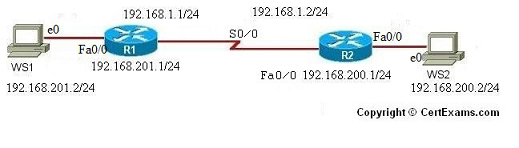
Instructions:
1. Configure R1 fastethernet 0/0 interface with IP Address 192.168.201.1/24 and serial0/0 interface with IP Address 192.168.1.1/24 and enable the interfaces
2. Configure R2 fastethernet 0/0 interface with IP Address 192.168.200.1/24 and serial0/0 interface with IP Address 192.168.1.2/24 and enable the interfaces
3. Configure workstations WS1 and WS2 with the IP addresses and default-gateways as
shown in the figure
4. Ping from R1 to R2, R1 to WS1 and R2 to WS2 and see that they are successful
5. Ping from WS1 to WS2 and see that it fails
6. Now set up default routes on R1 and R2 using ip route command by specifying appropriate next hop address
7. Ping from WS1 to WS2 and see that it is successful.
Note: Please refer to the CertExams.com Network Simulator software for complete lab with commands.
GUI Based :
Instructions:
1. Select device R1 and click Configure button and then Choose > Interface Management > interface and connections and in the edit interface connection tab select the interface and click edit. In the edit interface feature dialog enter the R1's Ethernet0 interface with IP Address 192.168.201.1 ,mask 255.255.255.0 and serial0 interface with IP Address 192.168.1.1 and mask as 255.255.255.0 and enable the interfaces
2. Select device R2 and configure Ethernet0 interface with IP Address 192.168.200.1 , mask as 255.255.255.0 and serial0 interface with IP Address 192.168.1.2 , mask as 255.255.255.0 and enable the interfaces. Follow step 1
3. Select device WS1 and choose > Interface Management > interface and connections and in the edit interface connection tab select the interface and click edit. In the edit interface feature dialog enter the WS1's Ethernet0 interface with IP Address 192.168.201.2 , mask 255.255.255.0 and default-gateway as 192.168.201.1
4. Select WS2 and configure WS2's ethernet0 ip address as 192.168.200.2 , mask 255.255.255.0 and default-gateway 192.168.200.1 follow step 3
5. Ping from R1 to R2, R1 to WS1 and R2 to WS2 and see that they are successful. Choose utilities > Ping and Traceroute.
6. Ping from WS1 to WS2 and see that it fails
7. Now set up default routes on R1 and R2
8. Select device R1 from Select Device drop down box.
9. Select Router > Default Routing and enter the next hop ip address as 192.168.1.2
10. Select device R2 from Select Device drop down box.
11. Select Router > Default Routing and enter the next hop ip address as 192.168.1.1
12. Ping from WS1 to WS2 and see that it is successful.
Note: Please refer to the CertExams.com Network Simulator software for complete lab with GUI Interface.





