CertExams.com Simulator Lab Exercises Answers
Description : This lab demonstrates the traceroute functionality
with respect to IPv6.
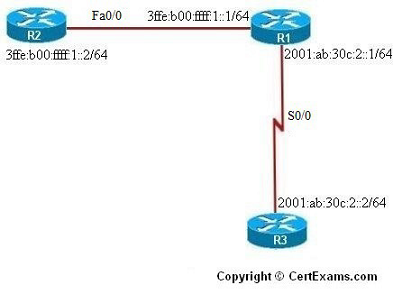
Instructions:
1. Enter into global configuration mode on R1 and assign IPv6 address to its serial 0/0 and fastethernet 0/0 interfaces.
2. Enter into global configuration mode on R2 and assign IPv6 address to its fastethernet 0/0 interface
3. Enter into global configuration mode on R3 and assign IPv6 address to its serial 0/0 interface.
4. Test for traceroute command on router R2 to trace its path to reach router R3.





