CertExams.com Simulator Lab Exercises Answers
Description: The purpose of this exercise is to configure RIP on all the devices and test for ping and trace commands.
The router rip command selects RIP as the routing protocol.
The network command assigns a major network number that the router is directly connected to. The RIP routing process associates interface addresses with the advertised network number and begins RIP packet processing on the specified interfaces.
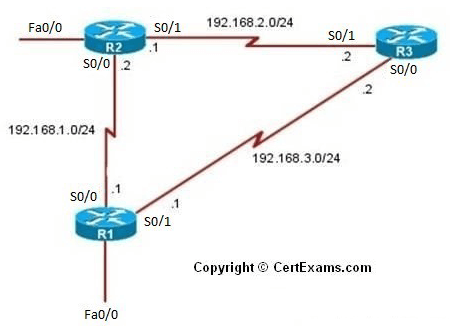
Instructions:
1. Assign the IP address of all the devices as given below
2. Bring all the interfaces to up
3. Configure RIP on all the devices
4. From R1 issue a ping and trace command to R2 and R3
| Device | Interface | IP Address | Mask |
| R1 | S0/0 S0/1 |
192.168.1.1 192.168.3.1 |
255.255.255.0 255.255.255.0 |
| R2 | S0/0 S0/1 |
192.168.1.2 192.168.2.1 |
255.255.255.0 255.255.255.0 |
| R3 | S0/0 S0/1 |
192.168.3.2 192.168.2.2 |
255.255.255.0 255.255.255.0 |
Note: Please refer to the CertExams.com Network Simulator software for complete lab with commands.





