CertExams.com Simulator Lab Exercises Answers
Description: This lab exercise demonstrates the commands
required to enter into RIP router configuration mode and then set or
change global parameters like maximum-path, redistribute etc.
Instructions
1. Enter into privileged mode on router R1.
2. Enter into global configuration mode.
3. Enter the command "ipv6 unicast-routing" that enables the forwarding of IPv6 unicast datagrams globally on the router.
4. Enter into router configuration mode using the command "ipv6 router rip <word> and then set the maximum path and timer values and then issue show ipv6 rip command to verify the parameters set.
R1>enable
R1#configure terminal
Enter configuration commands, one per line. End with CNTL/Z.
R1(config)#ipv6 unicast-routing
R1(config)#ipv6 router rip process1
R1(config-router)#maximum-paths 5
R1(config-router)#timers 5 15 10 30
R1(config-router)#^z
R1#show ipv6 rip
“show ipv6 rip” command output is shown below
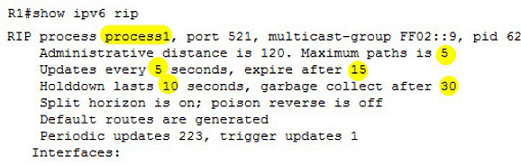
Note: ipv6 router rip <word> command configures an IPv6 RIP routing process and enters router configuration mode for the IPv6 RIP routing process. Use the word argument to identify a specific IPv6 RIP routing process.
The command "maximum-paths <number>" defines the maximum number of equal-cost routes that IPv6 RIP can support. The number-paths argument is an integer from 1 to 64.
The default for RIP is four paths. The command timers 5 15 10 30, the update timer is reduced to 5 sec, timeouts occur after 15 sec, holddown lasts 10 sec and garbage collection is activated after 30 sec.
Updates timer is the periodic update timer. Expire timer is the time in which updates expire. Holddown timer is the time for which a router will not accept any new updates for the router. Garbage collect timer s the time during which the route will be continued to advertise but if no updates are received, the route will be removed from the database.





