CertExams.com Simulator Lab Exercises Answers
Description: This lab exercise demonstrates the necessary
commands to enable and disable spanning tree protocol on a switch.
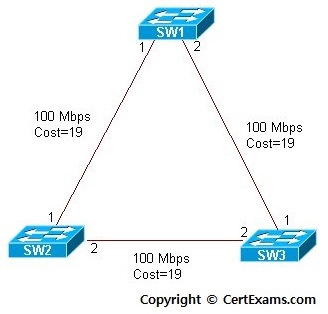
Instructions
1. Enter into configuration mode on SW1
2. Issue command "spanning-tree vlan <vlan-num> to enable spanning-tree on a specified VLAN
3. Issue no form of the command "spanning-tree vlan <vlan-num> to disable spanning-tree on the VLAN specified.
SW1>enable
SW1#configure terminal
SW1(config)#spanning-tree vlan 1
SW1(config)#no spanning-tree vlan 1
SW1(config)#exit
SW1#
Note: Spanning Tree Protocol (STP) is enabled by default on modern switches. It is possible to disable or enable the Spanning Tree Protocol (STP) when required.





