CertExams.com Simulator Lab Exercises Answers
Description : This lab exercise demonstrates configuring VTP with a VTP client.
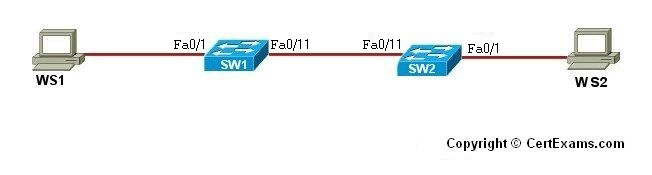
Instructions:
1. Configure SW1 with fast ethernet 0/11 interface and enable trunk line by issuing switchport mode trunk command
2. Enter into vlan database mode of SW1 and configure SW1 as VTP Server and set vtp domain to certexams, create VLAN 10 and VLAN 40 on SW1 and view the VTP information by issuing show vtp status command
3. Configure SW2 with fast ethernet 0/11 interface and enable trunk line by issuing switchport mode trunk command
4. Enter into vlan database mode of SW2 and configure SW2 as VTP Client and set vtp domain to certexams, and make sure that VLANs cannot be created on SW2 as SW2 is in the client mode, and view the VTP information by issuing show vtp status command
5. Confirm that the VLANs created on SW1 are seen on SW2 by issuing show vlan
command
Note: Please refer to the CertExams.com Network Simulator software for complete lab with commands.





