CertExams.com Simulator Lab Exercises Answers
Description: You configure a few switch ports for duplex. Choose SW1 switch from the n/w diagram and exit. The following commands are used for configuring the switch ports.
Instructions:
1. Set the inter-switch communication to full-duplex on Switch SW1 of port fa 0/1
2. Set the port speed to 100 mbps, and inter-switch communication to full-duplex on Switch SW1 of ports fa 0/3
3. Exit to privileged mode
4. Save the configuration to NVRAM
SW1>enable
SW1#configure terminal
SW1(config)#interface fastethernet 0/1
SW1(config-if)#duplex full
SW1(config-if)#exit
SW1(config)#interface fastethernet 0/3
SW1(config-if)#duplex full
SW1(config-if)#speed 100
SW1(config-if)#end
SW1#copy running-config startup-config
SW1#show running-config
Note: The syntax for setting port speed on an IOS switch is:
speed { 10 | 100 | auto }
For setting the speed to 10mbps on module 1 port 5, the command is
speed 10
Similarly, to set the duplex mode on a switch:
duplex { auto | full | half}
For setting the duplex to half, use the command:
duplex half
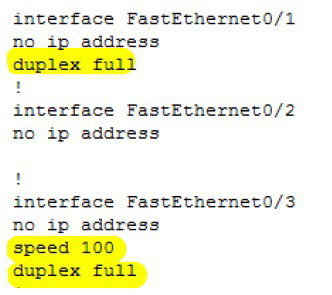
Explanation: Below screenshot shows the output from “show running-config” command after configuring duplex mode of fastethernet 0/1and speed and duplex mode of fastethernet 0/3 port. As you can see from the output above, the interface Fa0/3 will use the speed of 100 Mbps and full-duplex communication.